Adding Legendary Seals
Original guide by @stringsbutalt on Discord, rewritten by @n123original. This guide assumes you already know how to navigate romfs and use CfgBin Editor. If not, please read the starting guide. Additionally, this guide does not explain how to add the actual Yo-kai, please read the Adding Yo-kai guide for that, this is just for configuring the pages so that they can be obtained.
- First, check which game you are modding (if you somehow don’t already know).
- If you are modding YW1, open
legend_config*.cfg.binfromdata/res/legend. - If you are modding YW2 or later, it will be found in
data/res/characterinstead.- The
*refers to versioning, so instead of justlegend_config.cfg.binyou might also see files such aslegend_config_0.01b.cfg.bin. Pick the one with the highest version.
- The
- If you are modding YW1, open
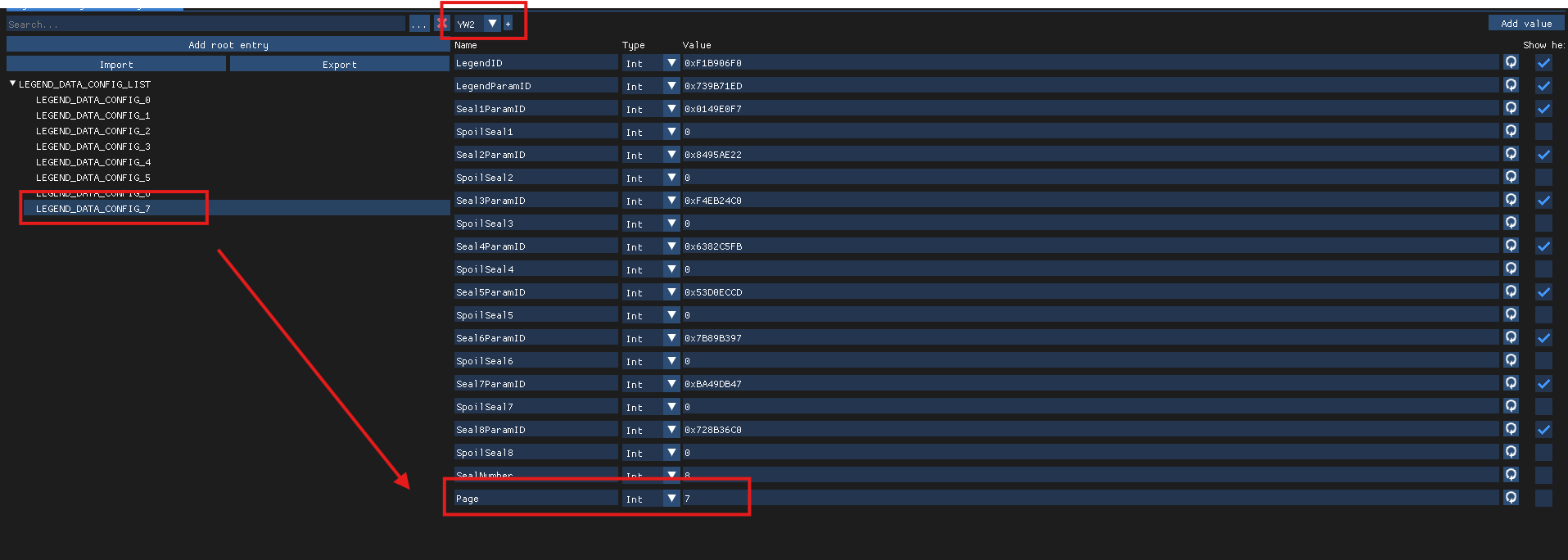
- Next, duplicate a
LEGEND_DATA_CONFIG_*entry. A new one should appear at the end of the tree. Open it. - Next, generate a new
LegendID. No template is needed. - Next, modify the
LegendParamIDto be theParamIDof the Legendary Yo-kai the page should award. - Next, modify the
Page, to match the index e.g.LEGEND_DATA_CONFIG_0would have aPageof 0,LEGEND_DATA_CONFIG_123would have aPageof 123, etc. - Next, modify the
Seal*ParamIDparameters, they are theParamIDs of the required Yo-kai for each slot.- Additionally you might want to modify the
SpoilSeal*parameters, if 1 they will be revealed even if not achieved yet, if 0, they will not.
- Additionally you might want to modify the
- Finally, increment (increase by 1) the
ChildCountof theLEGEND_DATA_CONFIG_LISTtree that contains the entries.